HUACODE全球企业华人转型升级首选平台正式上线了

HUACODE - 全球华企数字转型研究中心
Current Page:HomeProductsProduct Detail
Scan-to-Order Quick-Service System
# E-Commerce
Long-term Stable Updates
Exclusive Dev & Certified
Full Source, Multi-Port

Scan-to-Order Quick-Service System

System Overview A QR code ordering and fast sales system. From scan-to-order in store to order completion, the workflow is streamlined. It covers stor

Starting From
S$4,400/ license
Deploy in 3-7 天
Core Features
Store SelectionQR Code OrderingCategory SearchCustom OptionsCart & CheckoutDine-in / TakeoutOrder ManagementMenu Management
Languages
简体中文繁体中文English
Licensed & certified
Full source code
24/7 support
1-on-1 advisor
Share:

Scan-to-Order Quick-Service System feature overview

System Overview

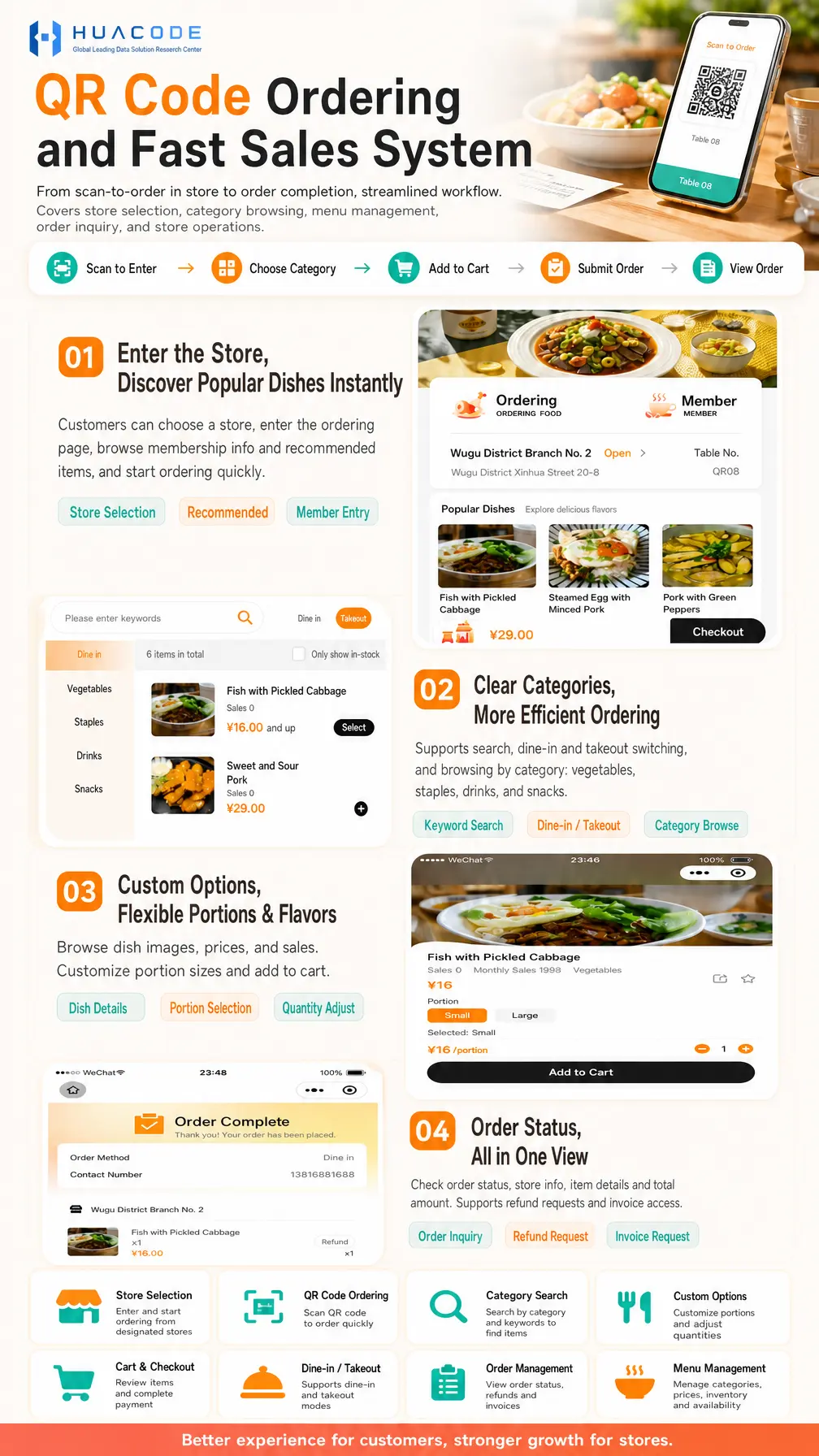
A QR code ordering and fast sales system. From scan-to-order in store to order completion, the workflow is streamlined. It covers store selection, category browsing, menu management, order inquiry and store operations.

Ordering Flow

  1. Scan to Enter
  2. Choose Category
  3. Add to Cart
  4. Submit Order
  5. View Order

Core Scenarios

  1. Enter the Store, Discover Popular Dishes Instantly: customers can choose a store, enter the ordering page, browse membership info and recommended items, and start ordering quickly; the page shows store name, open status, address and table number or scan entry, plus a popular dishes shelf (Store Selection / Recommended / Member Entry)
  2. Clear Categories, More Efficient Ordering: supports search, dine-in and takeout switching, and browsing by category — vegetables, staples, drinks and snacks — with an "only show in-stock" toggle (Keyword Search / Dine-in / Takeout / Category Browse)
  3. Custom Options, Flexible Portions & Flavors: browse dish images, prices and sales, customize portion sizes (small or large) and adjust quantity before adding to cart (Dish Details / Portion Selection / Quantity Adjust)
  4. Order Status, All in One View: check order status, order method, contact number, store info, item details and total amount, with support for refund requests and invoice access (Order Inquiry / Refund Request / Invoice Request)

Core Features

FeatureDescription
Store SelectionEnter and start ordering from designated stores, with store name, address and open status
QR Code OrderingScan the table QR code to order quickly
Category SearchSearch by category (vegetables, staples, drinks, snacks) and keywords to find items, with in-stock only view
Custom OptionsCustomize portions and adjust quantities, with dish images, prices and sales shown
Cart & CheckoutReview items and complete payment in one place
Dine-in / TakeoutSupports dine-in and takeout modes for different service styles
Order ManagementView order status, refunds and invoices, including order details and item breakdown
Menu ManagementManage categories, prices, inventory and availability

Business Value

Better experience for customers, stronger growth for stores.

Accepted Payments
💳 Stripe🔵 Alipay💚 WeChat Pay
Frequently Asked Questions
Do customers need to download an app to order?+
No. Customers scan the table QR code with WeChat to enter the store and order — the ordering page shows recommended dishes and membership info right away.
Does it support both dine-in and takeout?+
Yes. The ordering page switches between dine-in and takeout, and the order detail records the order method and contact number so both service styles are covered.
Can portions and quantities be customized?+
Yes. The dish detail page offers portion options such as small or large with per-portion pricing; customers adjust the quantity and add to cart, while images, prices and sales figures are shown.
Can customers check orders and request refunds or invoices themselves?+
Yes. The order detail shows completion status, order method, contact number, store info, item details and total amount, and provides refund request and invoice request entries.
Can the store side manage the menu and orders?+
Yes. Menu management covers categories, prices, inventory and availability, while order management covers order status, refunds and invoices for day-to-day store operations.
With a large menu, how do customers find what they want quickly?+
Customers can use keyword search or browse by category — vegetables, staples, drinks and snacks — and switch on the in-stock only filter to hide sold-out items, while the popular dishes shelf on the home page surfaces trending items.

Hot Recommendations

No related products yet
View All Products