HUACODE全球企业华人转型升级首选平台正式上线了

HUACODE - 全球华企数字转型研究中心
Current Page:HomeProductsProduct Detail
Dada-Model Intra-City Delivery App System
# Logistics
Long-term Stable Updates
Exclusive Dev & Certified
Full Source, Multi-Port

Dada-Model Intra-City Delivery App System

System Overview A same-city delivery mini program covering the full process of ordering, acceptance and dispatch under the model "I place an order, yo

Starting From
S$7,000/ license
Deploy in 3-7 天
Languages
简体中文繁体中文English
Licensed & certified
Full source code
24/7 support
1-on-1 advisor
Share:

Dada-Model Intra-City Delivery App System feature overview

System Overview

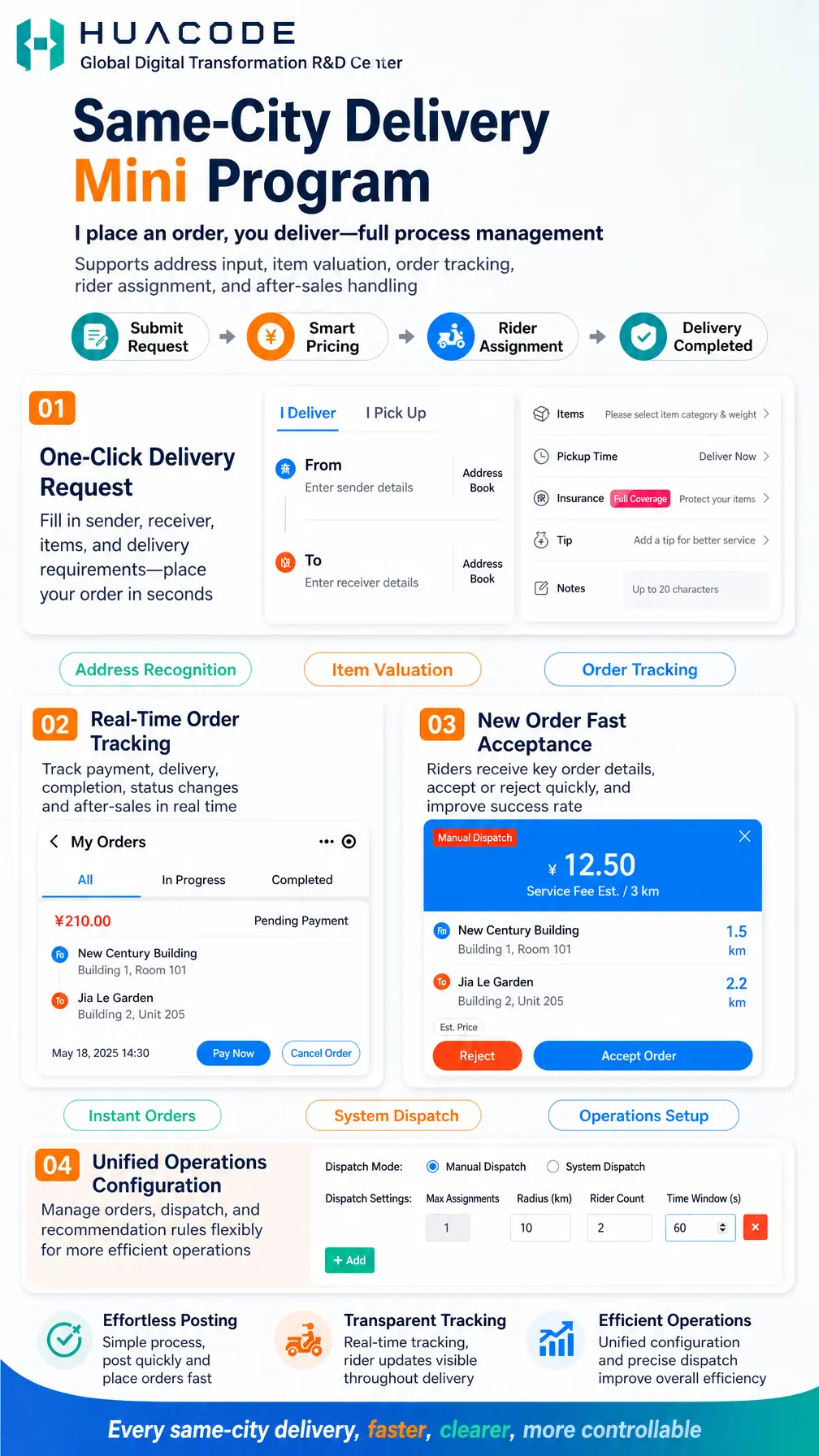
A same-city delivery mini program covering the full process of ordering, acceptance and dispatch under the model "I place an order, you deliver". It supports address input, item valuation, order tracking, rider assignment and after-sales handling. Customers fill in sender, receiver, items and delivery requirements once and place an order in seconds, while the system prices the job smartly by item category, weight and distance. Riders see key order details in the order hall and can accept or reject quickly, and operators configure dispatch modes and push strategies from a single console — making every same-city delivery faster, clearer and more controllable.

Delivery Workflow

  1. Submit Request: choose I Deliver or I Pick Up and fill in sender, receiver and item details
  2. Smart Pricing: the fee is estimated from item category, weight and distance
  3. Rider Assignment: riders grab the order or accept a system dispatch and start the run
  4. Delivery Completed: order status updates in real time through to completion and after-sales

Highlights

  • 01 One-Click Delivery Request: fill in sender, receiver, items, and delivery requirements — place your order in seconds (Address Recognition | Item Valuation | Order Tracking)
  • 02 Real-Time Order Tracking: track payment, delivery, completion, status changes and after-sales in real time
  • 03 New Order Fast Acceptance: riders receive key order details, accept or reject quickly, and improve success rate (Instant Orders | System Dispatch | Operations Setup)
  • 04 Unified Operations Configuration: manage orders, dispatch, and recommendation rules flexibly for more efficient operations

Core Features

  • Order Form: I Deliver and I Pick Up modes, with sender and receiver details selectable from the Address Book
  • Items & Pickup Time: select item category and weight, choose Deliver Now or schedule a pickup time
  • Insurance & Tips: Full Coverage insurance protects items; add a tip for better service and faster acceptance
  • Order Notes: free-text notes up to 20 characters
  • Order Management: All / In Progress / Completed views with Pay Now and Cancel Order actions
  • Rider Acceptance: order cards show estimated service fee, item category and weight, pickup and drop-off distance and insurance status, with Reject and Accept Order actions
  • Dispatch Control: switch between Manual Dispatch and System Dispatch modes
  • Push Strategy: dispatch settings for max assignments, radius (km), rider count and time window (s), with multiple rules supported

Detailed Feature List

SideModuleFunctions
Customer Side (Mini Program)Ordering & PricingI Deliver / I Pick Up switching; From and To address entry; Address Book selection; address recognition; item category and weight selection; Deliver Now or scheduled pickup time; Full Coverage insurance; tip to speed up acceptance; notes up to 20 characters; smart price estimation
Customer Side (Mini Program)Orders & After-salesMy Orders with All / In Progress / Completed tabs; order amount and status display; Pay Now for pending payment orders; Cancel Order; real-time tracking during delivery; completed order history; after-sales entry
Rider SideAcceptance & FulfillmentOrder hall with key delivery details; Manual Dispatch tag; estimated service fee; item category and weight; pickup and drop-off distances in km; insured order indicator; Reject; Accept Order; instant order grabbing
Admin ConsoleDispatch & AssignmentDispatch mode switching between Manual Dispatch and System Dispatch; manual assignment; dispatch settings for max assignments, radius (km), rider count and time window in seconds; add and remove multiple push rules
Admin ConsoleOperations SetupUnified operations configuration; pricing and item category maintenance; insurance and tip policy; order status and after-sales management; visible end-to-end delivery process

Business Value

  • Effortless Posting: simple process, post quickly and place orders fast
  • Transparent Tracking: real-time tracking, rider updates visible throughout delivery
  • Efficient Operations: unified configuration and precise dispatch improve overall efficiency
Accepted Payments
💳 Stripe🔵 Alipay💚 WeChat Pay
Frequently Asked Questions
What kinds of errands are supported?+
The order page offers two modes — I Deliver for sending items and I Pick Up for collecting items on the customer's behalf. Both require sender and receiver details plus item category and weight, and support Deliver Now or a scheduled pickup time.
How is the delivery fee calculated?+
Pricing is generated from item category, weight and pickup-to-drop-off distance. The rider's order card shows the estimated service fee together with both distances — for example ¥12.50 for a 3 km job across pickup and drop-off points 1.5 km and 2.2 km away. Customers can add a tip for faster acceptance.
Can the platform switch between rider grabbing and system dispatch?+
Yes. The console lets you switch the dispatch mode between Manual Dispatch and System Dispatch, with manual assignment available as well. For grabbing, dispatch settings cover max assignments, radius (km), rider count and time window (s), and multiple rules can be added for tiered pushing.
Is there protection if an item is damaged or lost?+
Customers can add Full Coverage insurance when ordering so insured items are eligible for full compensation. The rider's order card carries an insured indicator so riders handle those jobs with extra care.
Can customers see order progress and reach after-sales?+
Yes. My Orders is organized into All, In Progress and Completed. Pending payment orders can be paid or cancelled, deliveries are tracked in real time, and status changes plus the after-sales entry are visible in the order detail.
Can riders reject an assignment?+
Yes. System-dispatched or manually assigned orders arrive as a card where the rider can choose Reject or Accept Order. In grabbing mode the console pushes orders in batches by radius and rider count to reduce missed orders.

Hot Recommendations

No related products yet
View All Products