HUACODE全球企业华人转型升级首选平台正式上线了

HUACODE - 全球华企数字转型研究中心
Current Page:HomeProductsProduct Detail
Office Automation System
# HR & Payroll
Long-term Stable Updates
Exclusive Dev & Certified
Full Source, Multi-Port

Office Automation System

System Overview The OA Office Management System centralizes approval workflows, form design, employee management, contract finance and permission cont

Starting From
S$3,100/ license
Deploy in 3-7 天
Languages
简体中文繁体中文English
Licensed & certified
Full source code
24/7 support
1-on-1 advisor
Share:

Office Automation System feature overview

System Overview

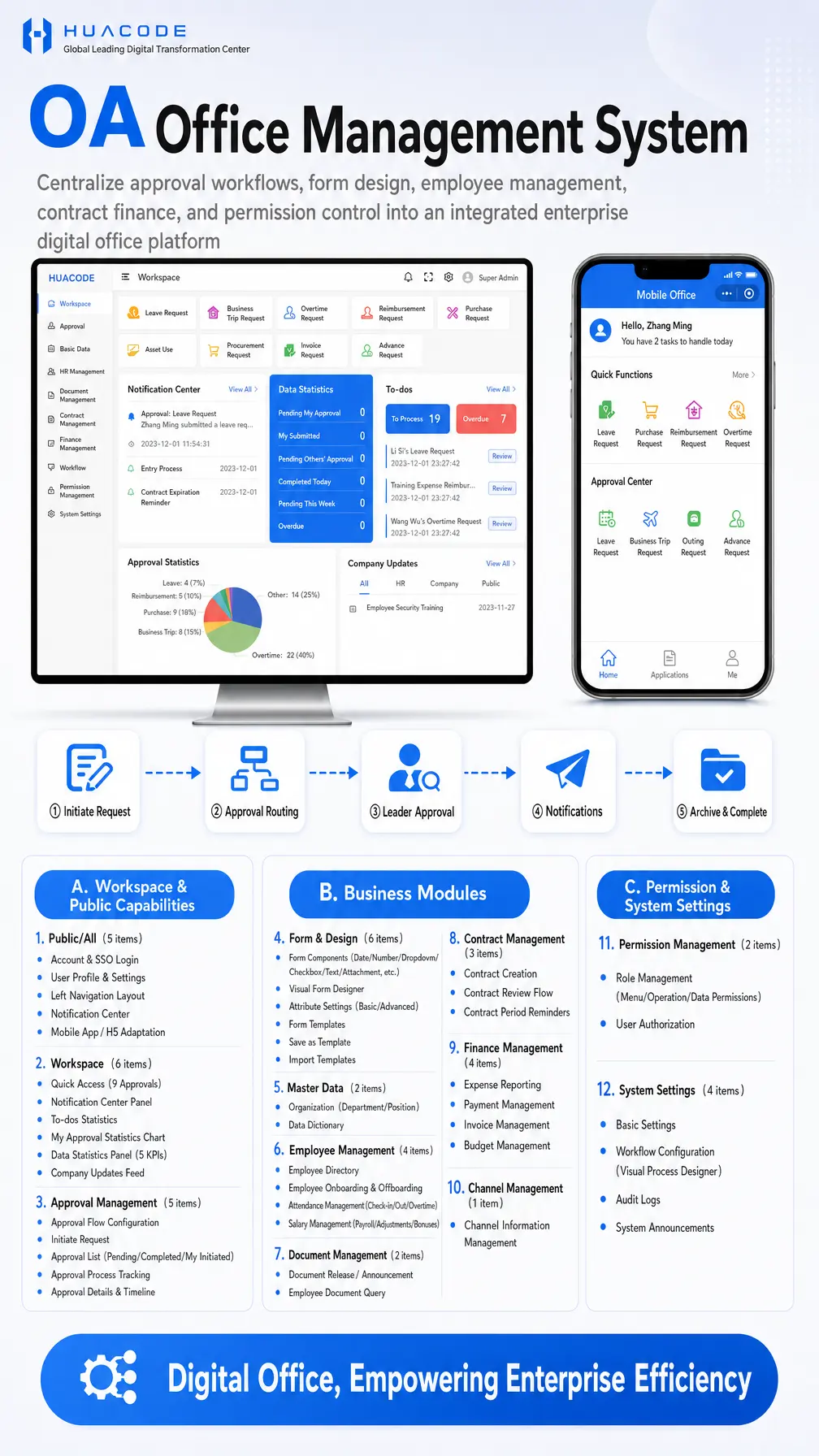
The OA Office Management System centralizes approval workflows, form design, employee management, contract finance and permission control into an integrated enterprise digital office platform, available on PC web and as a mobile app / H5. Twelve modules are grouped into three blocks — Workspace & Public Capabilities, Business Modules, and Permission & System Settings. The workspace offers quick access to nine approval types, a notification center panel, to-dos statistics, my approval statistics chart, a five-KPI data statistics panel and a company updates feed, delivering digital office that empowers enterprise efficiency.

Approval Workflow

  1. Initiate Request: an employee picks an approval type from the workspace or mobile app and fills in the form
  2. Approval Routing: the request is routed automatically along the configured approval flow
  3. Leader Approval: approvers can approve, reject or reassign, with full approval details and timeline
  4. Notifications: notified parties receive updates through the notification center
  5. Archive & Complete: the result is archived and feeds statistics and audit logs

Core Features

  • Approval Management: approval flow configuration, initiate request, approval list (pending / completed / my initiated), approval process tracking, approval details & timeline
  • Form & Design: form components (date, number, dropdown, checkbox, text, attachment and more), visual form designer, attribute settings (basic / advanced), form templates, save as template, import templates
  • Workspace: quick access to 9 approvals, notification center panel, to-dos statistics, my approval statistics chart, data statistics panel with 5 KPIs, company updates feed
  • Master Data: organization (department / position), data dictionary
  • Employee Management: employee directory, onboarding & offboarding, attendance management (check-in / out / overtime), salary management (payroll / adjustments / bonuses)
  • Contract Management: contract creation, contract review flow, contract period reminders
  • Finance Management: expense reporting, payment management, invoice management, budget management
  • Permission & System Settings: role management (menu / operation / data permissions), user authorization, basic settings, workflow configuration with a visual process designer, audit logs, system announcements

Module Overview

  • A. Workspace & Public Capabilities: Public/All, Workspace, Approval Management
  • B. Business Modules: Form & Design, Master Data, Employee Management, Document Management, Contract Management, Finance Management, Channel Management
  • C. Permission & System Settings: Permission Management, System Settings

Detailed Feature List

BlockModuleFunctions
A. Workspace & Public Capabilities1. Public/All (5 items)Account & SSO login; user profile & settings; left navigation layout; notification center; mobile app / H5 adaptation
A. Workspace & Public Capabilities2. Workspace (6 items)Quick access (9 approvals); notification center panel; to-dos statistics; my approval statistics chart; data statistics panel (5 KPIs); company updates feed
A. Workspace & Public Capabilities3. Approval Management (5 items)Approval flow configuration; initiate request; approval list (pending / completed / my initiated); approval process tracking; approval details & timeline
B. Business Modules4. Form & Design (6 items)Form components (date / number / dropdown / checkbox / text / attachment, etc.); visual form designer; attribute settings (basic / advanced); form templates; save as template; import templates
B. Business Modules5. Master Data (2 items)Organization (department / position); data dictionary
B. Business Modules6. Employee Management (4 items)Employee directory; employee onboarding & offboarding; attendance management (check-in / out / overtime); salary management (payroll / adjustments / bonuses)
B. Business Modules7. Document Management (2 items)Document release / announcement; employee document query
B. Business Modules8. Contract Management (3 items)Contract creation; contract review flow; contract period reminders
B. Business Modules9. Finance Management (4 items)Expense reporting; payment management; invoice management; budget management
B. Business Modules10. Channel Management (1 item)Channel information management
C. Permission & System Settings11. Permission Management (2 items)Role management (menu / operation / data permissions); user authorization
C. Permission & System Settings12. System Settings (4 items)Basic settings; workflow configuration (visual process designer); audit logs; system announcements
Accepted Payments
💳 Stripe🔵 Alipay💚 WeChat Pay
Frequently Asked Questions
Can approval flows be configured without development work?+
Yes. System settings include workflow configuration backed by a visual process designer, and approval management supports flow configuration plus approve / reject / reassign actions — business users can maintain flows without developer involvement.
Which approval types are supported?+
The workspace exposes quick access to nine approval types, including leave, business trip, overtime, reimbursement, purchase, asset use, procurement, invoice and advance requests, with the mobile app carrying the same quick entries.
Are forms customizable, and how are sensitive fields such as salary handled?+
The visual form designer offers a component library (date, number, dropdown, checkbox, text, attachment and more), attribute settings, form templates, save as template and import templates, so forms can be built and reused per scenario, including salary management fields.
Does it cover the employee lifecycle and attendance together?+
Yes. Employee management covers the employee directory, onboarding and offboarding, attendance management (check-in / out / overtime) and salary management (payroll / adjustments / bonuses), with master data providing organization and data dictionary underneath.
Are contract expiries reminded automatically?+
Yes. Contract management provides contract creation, contract review flow and contract period reminders, working together with the notification center and to-dos statistics in the workspace.
How is data visibility controlled per role?+
Permission management provides role management across menu, operation and data permissions plus user authorization, so visibility can be scoped on three dimensions, while audit logs in system settings keep every action traceable.

Hot Recommendations

No related products yet
View All Products