HUACODE全球企业华人转型升级首选平台正式上线了

HUACODE - 全球华企数字转型研究中心
Current Page:HomeProductsProduct Detail
Wholesale Ordering System Software
# E-Commerce
Long-term Stable Updates
Exclusive Dev & Certified
Full Source, Multi-Port

Wholesale Ordering System Software

System Overview Wholesale Ordering System Software makes wholesale ordering more efficient, and inventory and orders clearer. It connects wholesalers,

Starting From
S$2,400/ license
Deploy in 3-7 天
Core Features
Product Category ManagementProduct Specification ManagementBulk OrderingOrder SubmissionDelivery StatusInventory ManagementCustomer ManagementBusiness Dashboard
Languages
简体中文繁体中文English
Licensed & certified
Full source code
24/7 support
1-on-1 advisor
Share:

Wholesale Ordering System Software feature overview

System Overview

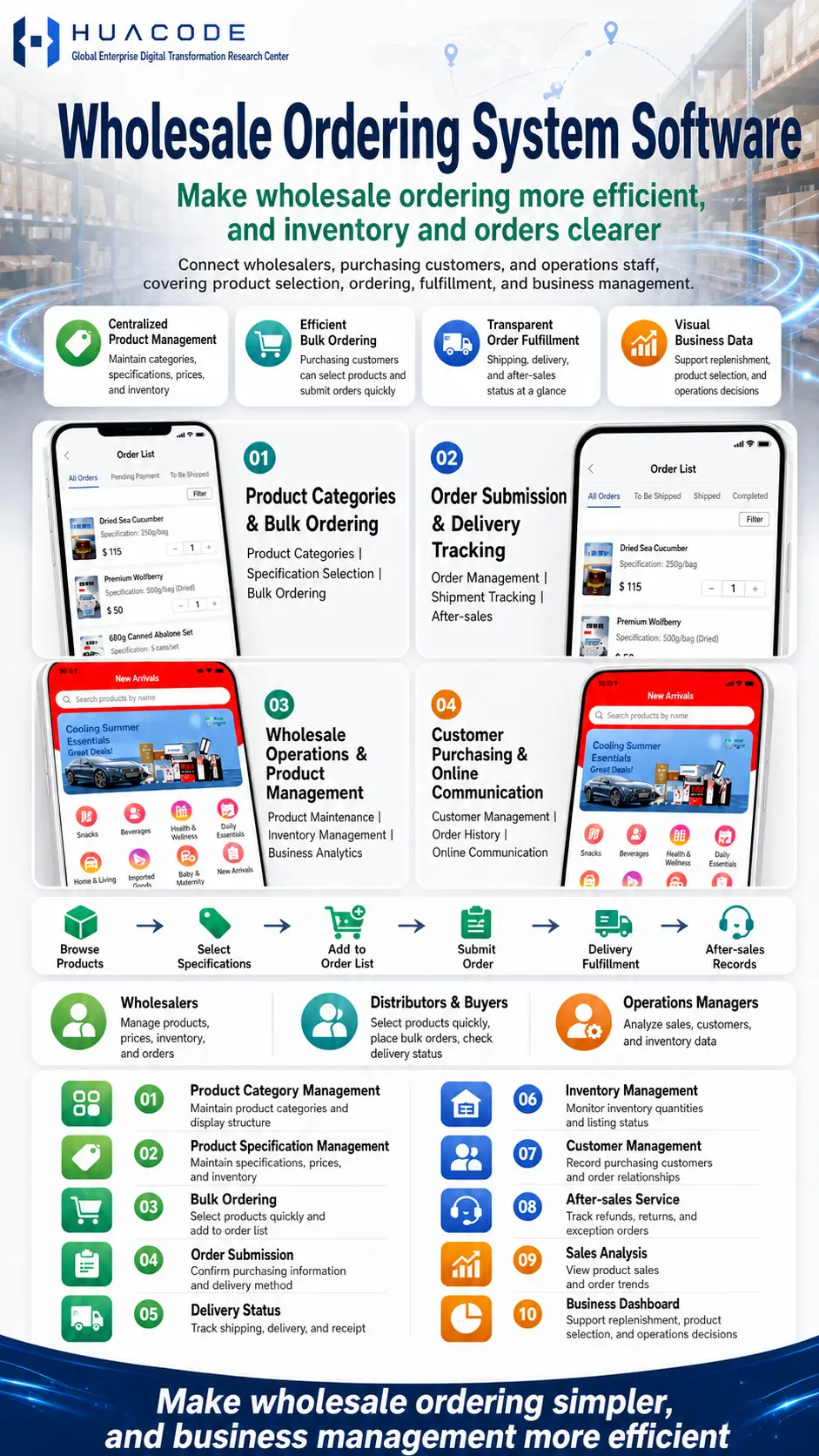
Wholesale Ordering System Software makes wholesale ordering more efficient, and inventory and orders clearer. It connects wholesalers, purchasing customers, and operations staff, covering product selection, ordering, fulfillment, and business management. Purchasing customers browse products on mobile, select specifications, add items to the order list and submit orders; wholesalers maintain categories, specifications, prices and inventory in one place while tracking shipping, delivery and after-sales; operations staff rely on sales analysis and the business dashboard to support replenishment, product selection, and operations decisions.

Core Value

  • Centralized Product Management: maintain categories, specifications, prices, and inventory
  • Efficient Bulk Ordering: purchasing customers can select products and submit orders quickly
  • Transparent Order Fulfillment: shipping, delivery, and after-sales status at a glance
  • Visual Business Data: support replenishment, product selection, and operations decisions

User Journey

  1. Browse Products: view orderable products by category and zone
  2. Select Specifications: choose the specification and confirm the price
  3. Add to Order List: add items in bulk and adjust quantities
  4. Submit Order: confirm purchasing information and delivery method
  5. Delivery Fulfillment: track shipping, delivery, and receipt
  6. After-sales Records: handle refunds, returns, and exception orders

Key Modules

  1. Product Categories & Bulk Ordering: Product Categories | Specification Selection | Bulk Ordering
  2. Order Submission & Delivery Tracking: Order Management | Shipment Tracking | After-sales
  3. Wholesale Operations & Product Management: Product Maintenance | Inventory Management | Business Analytics
  4. Customer Purchasing & Online Communication: Customer Management | Order History | Online Communication

Core Features

  • Product Category Management: maintain product categories and display structure
  • Product Specification Management: maintain specifications, prices, and inventory
  • Bulk Ordering: select products quickly and add to order list
  • Order Submission: confirm purchasing information and delivery method
  • Delivery Status: track shipping, delivery, and receipt
  • Inventory Management: monitor inventory quantities and listing status
  • Customer Management: record purchasing customers and order relationships
  • After-sales Service: track refunds, returns, and exception orders
  • Sales Analysis: view product sales and order trends
  • Business Dashboard: support replenishment, product selection, and operations decisions

Who It Serves

  • Wholesalers: manage products, prices, inventory, and orders
  • Distributors & Buyers: select products quickly, place bulk orders, check delivery status
  • Operations Managers: analyze sales, customers, and inventory data

Detailed Feature List

SideModuleFeatures
Buyer AppStorefront & Product SelectionNew Arrivals storefront with Search products by name; campaign banner (e.g. Cooling Summer Essentials, Great Deals); category entries (Snacks, Beverages, Health & Wellness, Daily Essentials, Home & Living, Imported Goods, Baby & Maternity, New Arrivals); browse products by category
Buyer AppOrder List & Bulk OrderingProduct cards showing name, specification and unit price (e.g. Dried Sea Cucumber 250g/bag, Premium Wolfberry 500g/bag Dried, 680g Canned Abalone Set 5 cans/set); quantity steppers for fast adjustment; add items to the order list in bulk; confirm purchasing information and delivery method before submitting
Buyer AppOrders & Delivery TrackingOrder List with status tabs (All Orders, Pending Payment, To Be Shipped, Shipped, Completed) and a Filter control; shipping, delivery and receipt tracking; after-sales and exception order records
Buyer AppCommunication & HistoryOnline communication with the wholesaler; order history lookup; product specification and price retained with each order
Wholesaler / AdminProducts & InventoryMaintain product categories and display structure; maintain specifications, prices and inventory; monitor inventory quantities and listing status
Wholesaler / AdminOrders & After-salesOrder management and review; shipment tracking; refunds, returns and exception order handling
Wholesaler / AdminCustomers & DataRecord purchasing customers and order relationships; product sales and order trend analysis; business dashboard supporting replenishment, product selection and operations decisions

Business Value

  • Simpler Ordering: products, specifications and quantities are confirmed in one screen instead of over phone and chat
  • Clearer Inventory and Orders: inventory quantities, listing status and order status are visible in one place
  • Traceable Fulfillment: shipping, delivery, receipt and after-sales all leave a record
  • More Efficient Business Management: sales analysis and the business dashboard back replenishment and product-selection decisions
Accepted Payments
💳 Stripe🔵 Alipay💚 WeChat Pay
Frequently Asked Questions
How many steps does a purchasing customer need to place an order?+
The flow shown is six steps: Browse Products, Select Specifications, Add to Order List, Submit Order, Delivery Fulfillment, and After-sales Records. The first four happen in the buyer app, and the last two cover fulfillment and after-sales tracking.
How does the system handle multiple specifications and wholesale prices for one product?+
Product Specification Management maintains specifications, prices and inventory. On the buyer side the specification is selected before the price is confirmed, and every line in the order list carries its specification and unit price.
Can buyers see where an order is after it ships?+
Yes. Delivery Status tracks shipping, delivery and receipt, and the Order List separates orders into All Orders, Pending Payment, To Be Shipped, Shipped and Completed tabs with a Filter control.
How are refunds, returns and exception orders managed?+
The After-sales Service feature tracks refunds, returns and exception orders. It sits in the same Order Submission & Delivery Tracking module as order management and shipment tracking, so after-sales status is visible alongside order status.
How do wholesalers maintain customers and their ordering relationships?+
Customer Management records purchasing customers and order relationships and keeps order history, and online communication lets the wholesaler talk to buyers directly — all part of the Customer Purchasing & Online Communication module.
What business data do operations staff get?+
Sales Analysis shows product sales and order trends, while the Business Dashboard supports replenishment, product selection and operations decisions. Operations managers can analyze sales, customer and inventory data together.

Hot Recommendations

No related products yet
View All Products